Objects and schemas
fxquinox does not hard-code what a Shot or a Task looks like. The entity types, their fields, and the workflow schemas that scope them per project are all configuration you edit in Settings → Workflow.
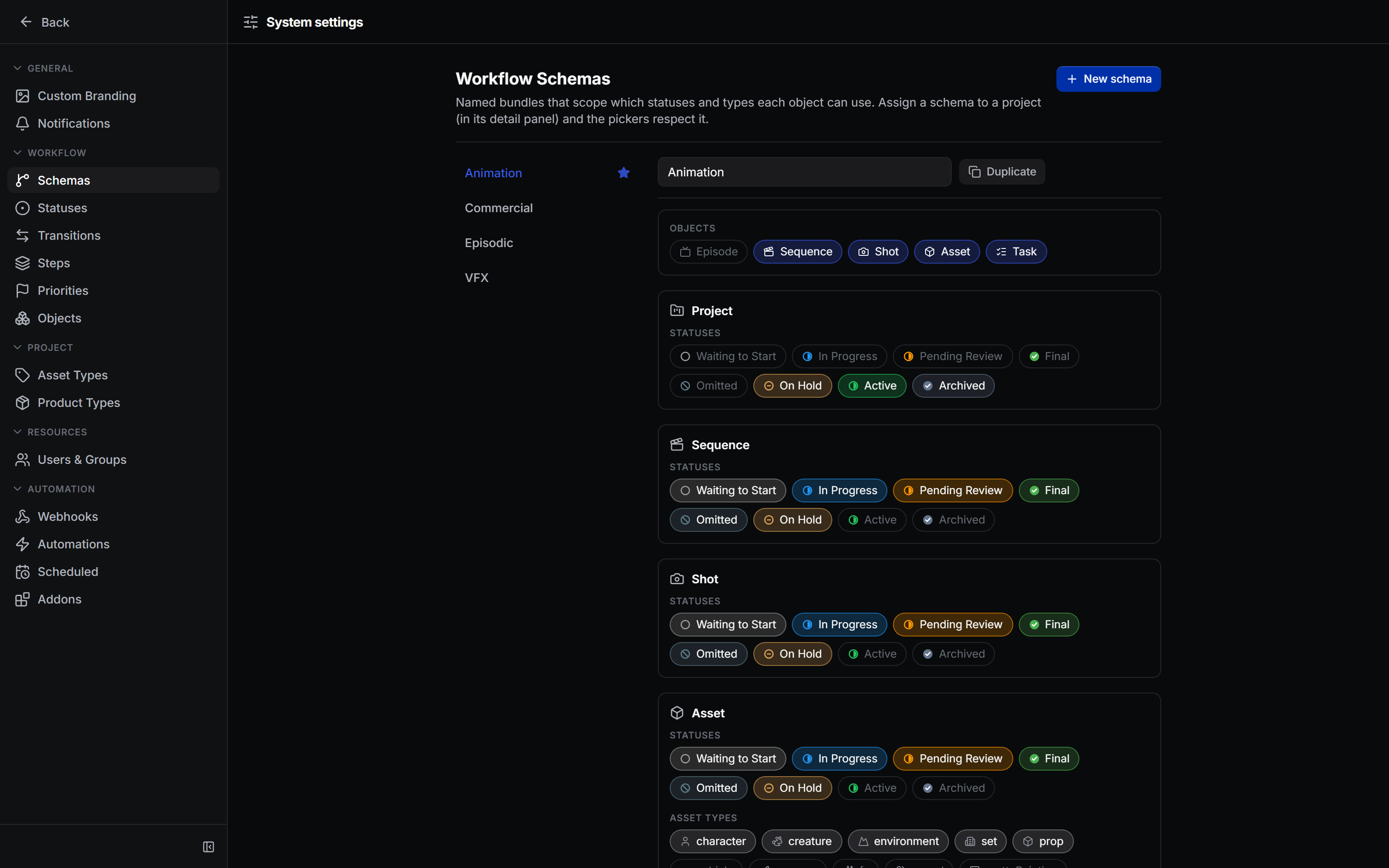
Built-in entity types
The seed schema defines these types out of the box:
| Type | Hierarchy mode | Notes |
|---|---|---|
| Project | none | Top-level container; carries FPS, start/end dates |
| Episode | nested | Optional; sits above Sequence in episodic pipelines |
| Sequence | nested | Groups shots; optionally under Episode |
| Shot | nested | Under Sequence; carries cut/frame ranges, FPS, priority |
| Asset | flat | Character, Prop, Environment, etc.; asset type is a configurable enum |
| Task | none | The unit of work; links to any container (Project, Episode, Sequence, Shot, Asset) |
| Product | none | Named publish family; carries a product type enum |
| Version | none | A single publish under a Product; carries frame range, author, inputs |
| TimeLog | none | Hours logged against a Task by a User |
| Note | none | Threaded comment on a Shot, Asset, Version, or Task |
| Playlist | none | Ordered list of Versions for review |
| Workfile | none | DCC workfile record linked to a Task |
| Representation | none | A file set under a Version (for review, delivery, etc.) |
| Site | none | Storage root configuration per platform |
Internal system types (User, ApiKey, SavedView, Automation, Webhook) are also entity records but are managed through their own Settings sections.
Fields
Every entity type has a set of fields, each defined by:
- a code (camelCase identifier) and display name,
- a data type —
text,int,float,bool,date,json,enum,entity_link, ormulti_entity_link, - optional config (allowed link types for relationship fields;
optionsandoption_labelsfor enum fields; aunithint, e.g."frame", for integer fields; awidgetoverride for specialised pickers such as"priority"or"user"), - a
workflow_scopedflag for fields whose options are scoped per workflow schema (Task'sstep, Asset'sasset_type).
seed_builtin_schema adds any missing fields on every server start but never
overwrites existing config, so admin customisations — colours, labels, icons —
survive restarts.
Workflow schemas
A workflow schema is a named bundle assigned to a project. It scopes, per object type:
- which objects (Episode, Sequence, Shot, Asset, Task) are active,
- which statuses each type can use,
- which task steps and asset types are available,
- optional task templates (named sets of steps to bulk-create tasks).
Four preset schemas ship out of the box:
| Preset | Objects | Character |
|---|---|---|
| Animation (default) | Sequence, Shot, Asset, Task | Full asset build + shot pipeline |
| VFX | Sequence, Shot, Asset, Task | Matchmove/roto/comp-heavy; no concept/rig steps |
| Episodic | Episode, Sequence, Shot, Asset, Task | Adds Episode; leaner shot pipeline |
| Commercial | Sequence, Shot, Asset, Task | Minimal pipeline; short-turnaround spots |
You can duplicate a preset and customise it, or create a new schema from scratch. Projects not explicitly assigned a schema fall back to the Animation default.
Change data, not code
Because the schema is stored as records, there are no migrations to run and no redeploy needed. Edit in Settings and all clients pick it up immediately. See How it works for the model.
Schema writes are Admin-only
Any authenticated user can read schema endpoints (GET); mutating them
requires the Admin role. The API enforces this at the router level —
the UI guard is cosmetic only.