How it works
fxquinox is metadata-driven: the things you track (projects, shots, assets, tasks, versions…) are not hard-coded tables — they are defined as data by a schema engine and stored as a single, uniform record type. One core enforces the rules and exposes them through one API; every tool is a client of that API.
The mental model in one line
Schema describes what kinds of things exist and how they link; records are the actual things; the publish chain records what produced what; the API is the only door in.
The big picture
flowchart LR
  PG[("Postgres<br/>records · JSONB")]:::data --> CORE

  subgraph CORE["Core · FastAPI"]
    direction TB
    SE("Schema engine"):::core
    QL("Query DSL"):::core
    PUB("Publish chain<br/>+ lineage"):::core
    AU("Auth"):::core
    EV("Events · WebSocket"):::core
    ME("Media"):::core
  end

  CORE --> API{{"Canonical HTTP API"}}:::api

  API --> SDK(["Python SDK"]):::client
  API --> WEB(["Web UI"]):::client
  API --> QT(["Qt desktop"]):::client
  API --> DCC(["Houdini · Nuke"]):::client

  style CORE fill:#0a0f20,stroke:#1c2438,color:#9fb0c8

  classDef data fill:#0c2a23,stroke:#1cbc90,color:#bff3e2,stroke-width:1.5px;
  classDef core fill:#0f1a3c,stroke:#3a5bf0,color:#dbe4ff,stroke-width:1.5px;
  classDef api fill:#002fa7,stroke:#8aa0f8,color:#f4f6ff,stroke-width:1.5px;
  classDef client fill:#221a3c,stroke:#a06bff,color:#ece2ff,stroke-width:1.5px;
Everything above the API is a client. None of them touch the database or re-implement workflow rules — that is The One Law, and it is what keeps four very different surfaces behaving identically.
Two layers: schema and data
There are really only two kinds of thing in the system.
The schema layer (the configuration) defines the object types, their fields,
the available statuses, the pipeline steps and priorities, and which transitions
are legal. The data layer is a single Record table: every project, shot,
task and version is a row whose shape is governed by its entity type, with all
its fields living in a JSON data column and relationships expressed as links.
flowchart LR
  subgraph SCHEMA["Schema layer · configuration"]
    direction TB
    ET("EntityType<br/><i>code · hierarchy</i>"):::core
    FD("FieldDef<br/><i>data_type · config</i>"):::core
    ST("Status<br/><i>state · flags</i>"):::core
  end

  REC[("Record<br/><i>entity_type · status · data (JSON)</i>")]:::data

  ET -->|"fields"| FD
  ET -->|"statuses"| ST
  REC -.->|"typed by"| ET

  classDef core fill:#0f1a3c,stroke:#3a5bf0,color:#dbe4ff,stroke-width:1.5px;
  classDef data fill:#0c2a23,stroke:#1cbc90,color:#bff3e2,stroke-width:1.5px;
  style SCHEMA fill:#0a0f20,stroke:#1c2438,color:#9fb0c8
Because types are data, you can add a custom entity type or field at runtime and every client picks it up — the grid, the SDK, and the API all derive their shape from the schema rather than from compiled code.
Why one Record table instead of one table per type?
A uniform record + JSON means new types and fields need no migrations, the
query DSL can filter across any type, and the web
grid, board and sidebar are all driven by the same schema metadata. Links
between records are stored as { "type": "Shot", "id": "…" } field values,
so the relationship graph is just data too.
The production hierarchy
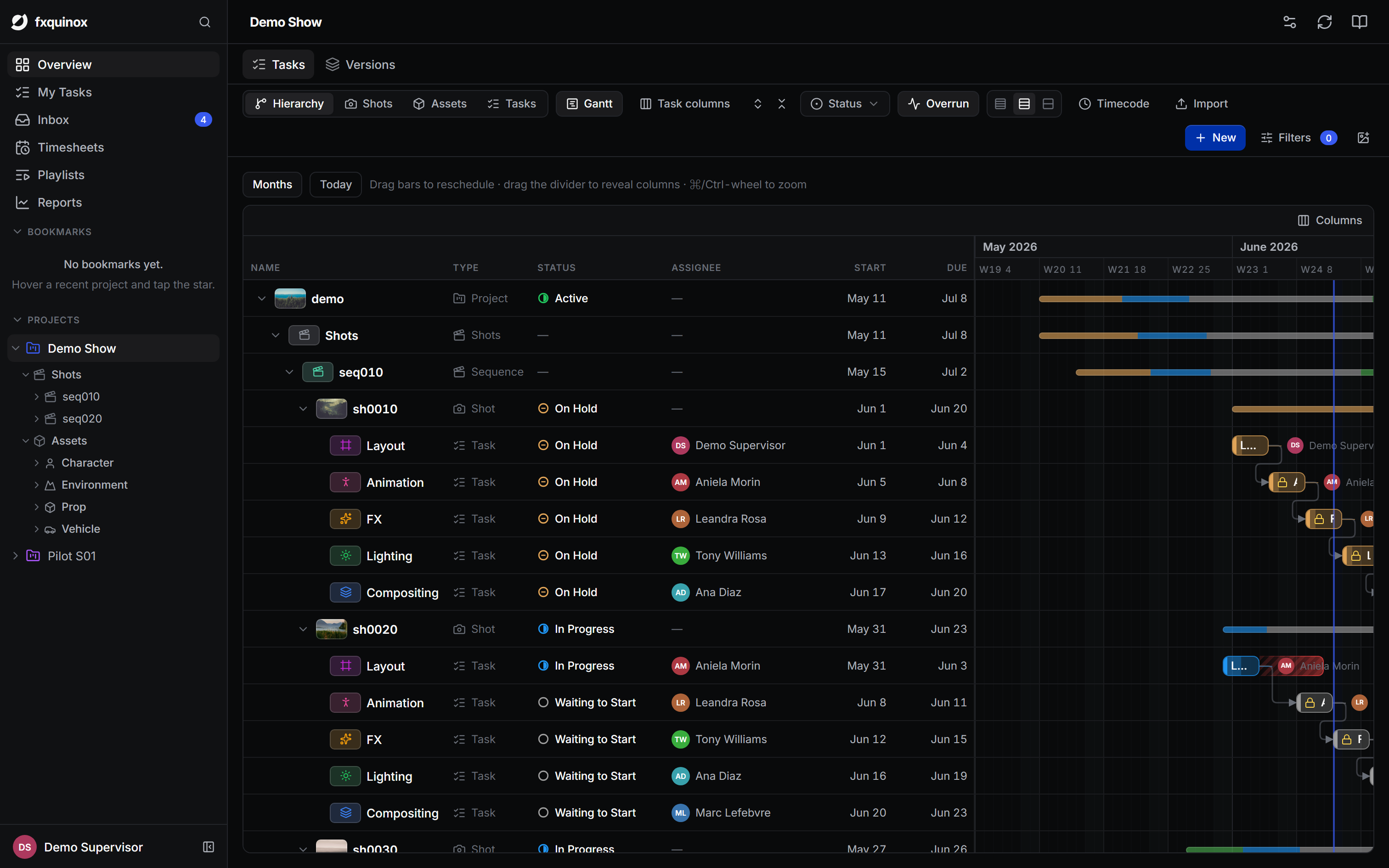
Production entities nest into a tree. Episodes are optional (used for episodic work); shots live under sequences; assets sit directly under the project. A Task is the unit of work and hangs off whatever it tracks.
graph TD
  P(["Project"]):::ctx --> EP(["Episode<br/><i>optional</i>"]):::ctx
  P --> SEQ(["Sequence"]):::ctx
  EP --> SEQ
  SEQ --> SH(["Shot"]):::ctx
  P --> AS(["Asset"]):::ctx

  SH --> T("Task"):::work
  AS --> T
  SEQ -.-> T
  EP -.-> T

  classDef ctx fill:#0e1f3c,stroke:#4493f8,color:#d6e9ff,stroke-width:1.5px;
  classDef work fill:#2c1d0c,stroke:#e6932b,color:#ffe6c2,stroke-width:1.5px;
A task carries a pipeline step (Layout, Animation, FX, Lighting, Compositing…), assignees, a priority, bid hours and dates.
How entities relate
Production context, the work, and the outputs it produces — colour-grouped by domain.
flowchart LR
  subgraph PROD["Production"]
    direction TB
    PRJ(["Project"]):::ctx --> EPI(["Episode"]):::ctx
    EPI --> SEQ(["Sequence"]):::ctx
    SEQ --> SHO(["Shot"]):::ctx
    PRJ --> ASS(["Asset"]):::ctx
  end

  subgraph WORK["Work"]
    direction TB
    TASK("Task"):::work
    TL("TimeLog"):::work
  end

  subgraph PUB["Publish & files"]
    direction TB
    PRD(["Product"]):::out --> VER(["Version"]):::out
    VER --> REP(["Representation"]):::out
    REP --> FLOC(["FileLocation"]):::out
    WF[/"Workfile"/]:::muted
    STE[("Site")]:::data
  end

  USR(["User"]):::people

  SHO ==> TASK
  ASS ==> TASK
  USR -. assignee .-> TASK
  TASK ==> PRD
  WF -. source .-> VER
  VER -. inputs .-> VER
  STE --> FLOC
  TASK --- TL

  classDef ctx fill:#0e1f3c,stroke:#4493f8,color:#d6e9ff,stroke-width:1.5px;
  classDef work fill:#2c1d0c,stroke:#e6932b,color:#ffe6c2,stroke-width:1.5px;
  classDef out fill:#0c2a1b,stroke:#1cbc90,color:#c7f3dd,stroke-width:1.5px;
  classDef people fill:#2c250c,stroke:#f1c40f,color:#fbeec2,stroke-width:1.5px;
  classDef data fill:#0c2a23,stroke:#1cbc90,color:#bff3e2,stroke-width:1.5px;
  classDef muted fill:#1a2030,stroke:#6b7488,color:#cdd3e0,stroke-width:1.5px;
  style PROD fill:#0a1124,stroke:#1c2438,color:#9fb0c8
  style WORK fill:#1a1408,stroke:#3a2c12,color:#c9a574
  style PUB fill:#08180f,stroke:#143226,color:#7fb89e
The entity catalog
What each built-in type is. (Types are data — projects can add their own.)
Project- Top of the tree. Holds show-wide settings (code, fps, dates) and scopes everything beneath it.
Episode- Optional grouping for episodic work; parents sequences.
Sequence- A group of shots; parented by an episode (or directly by the project).
Shot- A single continuous piece of footage — cut range, frame handles, fps, priority.
Asset- A reusable element (Character, Creature, Environment, Prop, Vehicle,
and more); the
asset_typeis a configurable, workflow-scoped enum.
Task- The unit of work. Links to the entity it tracks, carries a pipeline step, assignees, priority, bid hours, and dates.
TimeLog- Hours booked against a task by a user on a given day.
Product- A named output of a task (e.g.
lightingMain) — the stable identity a chain of versions shares. Version- A numbered iteration of a product. Records its author, a comment, the source workfile and its input versions (lineage). Carries frame range and fps metadata.
Representation- A concrete form of a version (e.g.
exr,mov), flagged for review or not, with files and tags. Workfile- The DCC scene a version was published from (path, software, version number).
Site·FileLocation- A storage location, and where a representation actually lives on it (path, availability) — the basis for multi-site sync.
Note- Feedback attached to a shot, asset, task or version. Supports @mentions, labels, and threaded replies.
Playlist- An ordered set of versions for review sessions.
User- A person (name, email, role). Assigned to tasks; authors versions.
ApiKey·SavedView·Automation·Webhook- System types: programmatic access tokens, saved filters/layouts, rule-driven automations, and outbound webhooks.
The publish chain & lineage
Publishing is the backbone that links the work to the files it produced, and links versions to the versions they were built from.
flowchart TD
  T("Task"):::work ==> PR(["Product<br/><i>named output</i>"]):::out
  PR ==> V(["Version<br/><i>v001, v002…</i>"]):::out
  WF[/"Workfile"/]:::muted -. source .-> V
  V -. inputs .-> V
  V ==> REP(["Representation<br/><i>exr · mov</i>"]):::out
  REP ==> FL(["FileLocation"]):::out
  STE[("Site")]:::data --> FL

  classDef work fill:#2c1d0c,stroke:#e6932b,color:#ffe6c2,stroke-width:1.5px;
  classDef out fill:#0c2a1b,stroke:#1cbc90,color:#c7f3dd,stroke-width:1.5px;
  classDef data fill:#0c2a23,stroke:#1cbc90,color:#bff3e2,stroke-width:1.5px;
  classDef muted fill:#1a2030,stroke:#6b7488,color:#cdd3e0,stroke-width:1.5px;
Publishing a task creates (or reuses) a Product, allocates the next
Version number, attaches one or more Representations, and records a
FileLocation per site. A version's inputs point at the versions it
consumed — so the chain forms a lineage DAG you can walk in either direction
("what did this come from?" / "what depends on this?").
Workflow & statuses
Each entity type has its own set of statuses; a WorkflowSchema assigned to a
project scopes which statuses (and steps and asset types) are available. A
typical task lifecycle — colours match the status palette used across the app:
stateDiagram-v2
  direction LR
  [*] --> wtg
  wtg --> ip : start
  ip --> rev : submit
  rev --> fin : approve
  rev --> ip : retake
  ip --> hld : block
  hld --> ip : resume
  wtg --> omt : omit
  ip --> omt : omit
  fin --> [*]

  classDef waiting fill:#1a2030,stroke:#8089a0,color:#dfe4ee,stroke-width:1.5px
  classDef wip fill:#0f1a3c,stroke:#3a5bf0,color:#dbe4ff,stroke-width:1.5px
  classDef review fill:#2c1d0c,stroke:#e6932b,color:#ffe6c2,stroke-width:1.5px
  classDef done fill:#0c2a1b,stroke:#1cbc90,color:#c7f3dd,stroke-width:1.5px
  classDef hold fill:#2c0f12,stroke:#e74c3c,color:#ffd6dd,stroke-width:1.5px
  classDef cancelled fill:#1a2030,stroke:#607d8b,color:#cfd8dc,stroke-width:1.5px

  class wtg waiting
  class ip wip
  class rev review
  class fin done
  class hld hold
  class omt cancelled
Statuses carry flags the whole app reads — so behaviour is driven by data, not hard-coded names:
| Code | Display name | State | Flags |
|---|---|---|---|
waitingToStart |
Waiting to Start | not_started |
— |
inProgress |
In Progress | in_progress |
is_wip |
pendingReview |
Pending Review | in_progress |
is_feedback |
final |
Final | done |
is_done |
onHold |
On Hold | blocked |
— |
omitted |
Omitted | cancelled |
is_done |
Projects carry their own statuses (active, onHold, archived). Legal
transitions are themselves data (Workflow rows with optional role gates), so
the same enforcement applies no matter which client requests the change.